
Published 23 Jul 2024
What Is On-Page SEO and Why Does It Matter for Your Rankings?
New to SEO services? Learn what they include, why they drive growth, and how to choose the right approach for your business. Get your free SEO audit today!
What Is On-Page SEO and Why Does It Matter for Your Rankings?
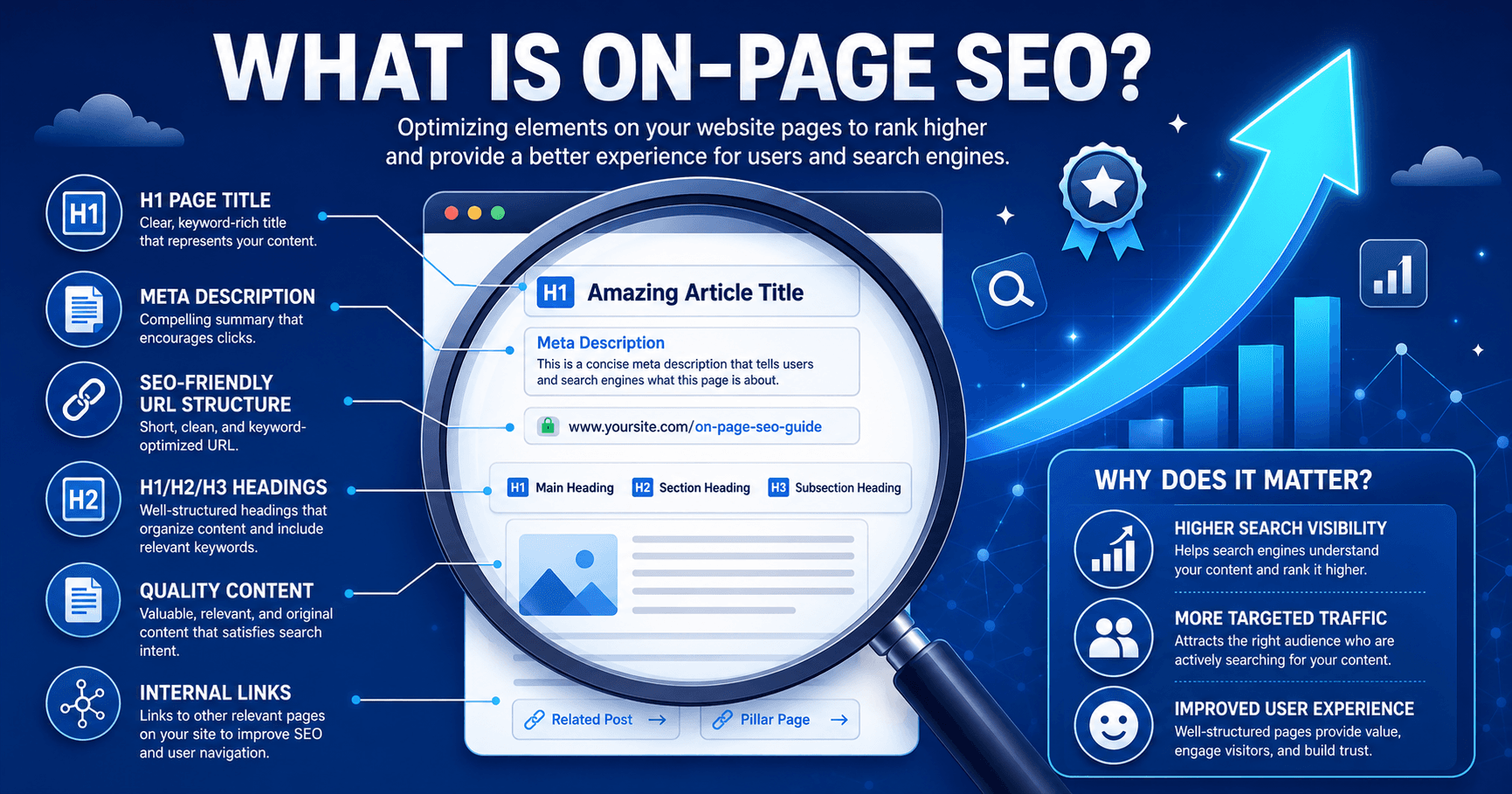
On-page SEO is the practice of optimizing the elements on your own website — content, headings, meta tags, URLs, and internal links — so search engines can understand and rank your pages. Get it right, and your site becomes both easier to find and easier to use.
Quick Answer: On-page SEO matters because it directly controls how search engines interpret your content and how users experience your pages. Strong on-page optimization improves rankings, increases click-through rates, and keeps visitors on your site longer — all of which compound into measurable organic growth.
Why Does On-Page SEO Actually Move the Needle?
Search engines don't just crawl a page — they try to figure out what it's about and whether it deserves a spot near the top of the results. On-page SEO is how you answer that question for them, in a language algorithms can parse: clear titles, logical headings, relevant content, and a site structure that doesn't make crawlers (or humans) work too hard.
The payoff for getting this right is enormous, and the data backs it up. The number one organic result on Google captures roughly 39.8% of all clicks, while the third-place result gets only around 10.2% — a drop of nearly 30 percentage points for just two positions (SE Ranking, via Instant Press). Organic search also remains the single largest traffic channel for most websites, driving an estimated 53% of all website traffic (Instant Press). And the return on that effort isn't trivial either — SEO delivers an estimated 8x return on investment, roughly double what paid search typically produces (Instant Press).
The takeaway: ranking position isn't a vanity metric — it's the single biggest lever on how much of your traffic, and revenue, actually reaches your site.
On-page SEO doesn't work in isolation, either. It pairs with Google's own Search Essentials guidance on writing clear, descriptive page titles, and it's the foundation that off-page tactics like link building are built on top of. If your site's foundation is already solid, a dedicated link building strategy is usually the next lever worth pulling.
It's worth being honest about scope here too: on-page SEO is necessary, but it's rarely sufficient on its own. A page can be flawlessly optimized internally and still struggle to rank in a competitive niche without enough external authority pointing to it. Think of on-page work as making sure your site deserves to rank — the rest of the ecosystem, including backlinks and brand signals, determines whether it gets the chance to prove that.
What Are the Key Elements of On-Page SEO?
A handful of on-page elements consistently carry the most weight. Nail these, and you've covered the majority of what search engines — and visitors — are actually evaluating.
Keyword research: Identifying the terms your audience actually searches for, using tools like Google Keyword Planner, SEMrush, or Ahrefs, so your content targets real demand rather than guesswork.
Content quality: Writing comprehensive, genuinely useful content that satisfies search intent rather than just repeating a keyword. Google has been explicit that thin or repetitive content gets down-ranked in favor of pages that demonstrate real expertise.
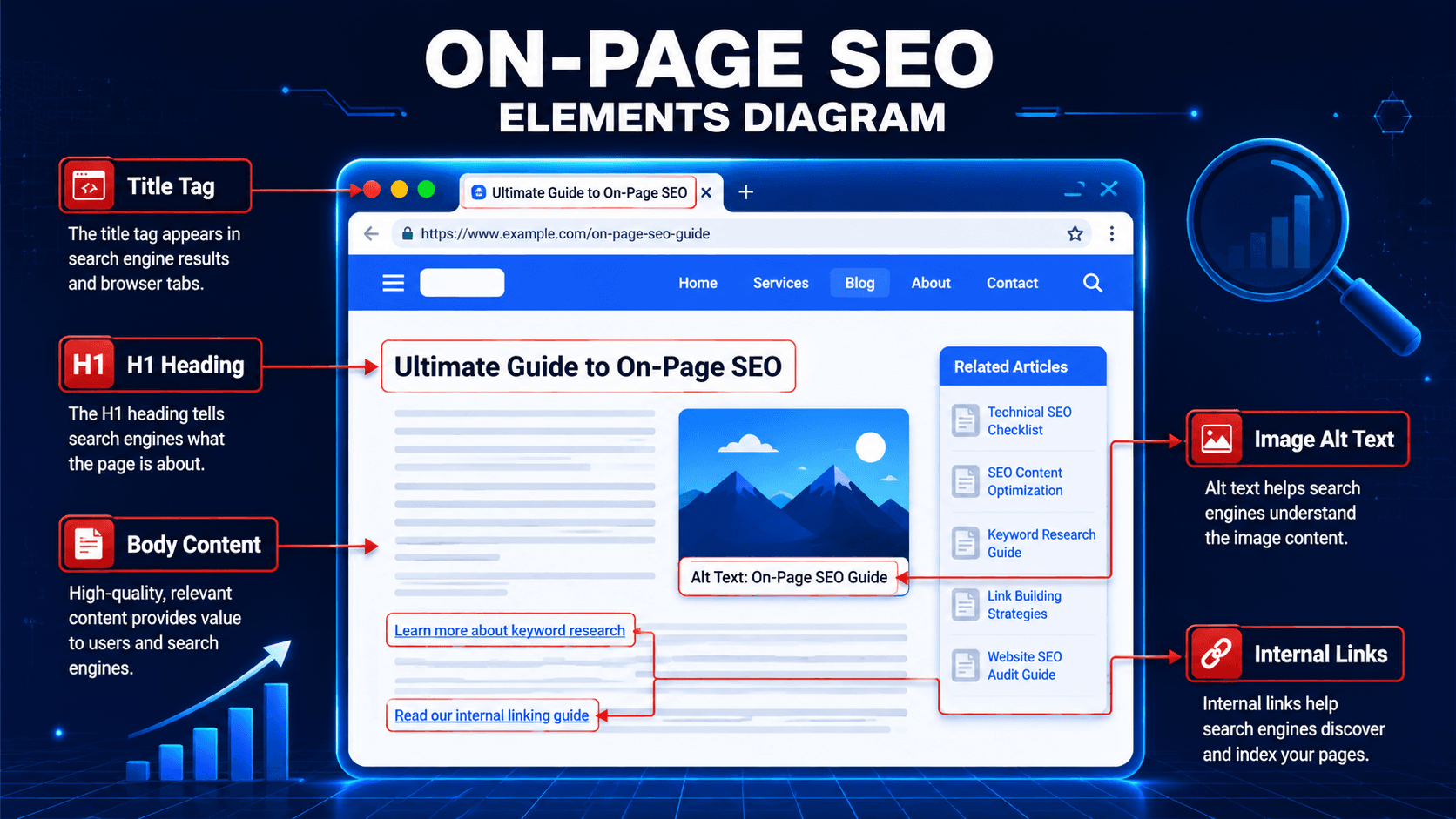
Title tags and meta descriptions: Crafting unique, keyword-relevant titles (ideally under 60 characters) and meta descriptions (under 160 characters) for every page, since these directly shape click-through rate from the search results page.
Heading structure: Using a logical H1/H2/H3 hierarchy so both readers and crawlers can quickly understand how a page is organized.
URL structure: Keeping URLs short, descriptive, and free of unnecessary parameters or symbols.
Image optimization: Adding descriptive alt text and file names, and compressing images so they don't slow the page down.
Internal linking: Connecting related pages with descriptive anchor text, which helps both navigation and the distribution of ranking authority across your site.
Schema markup: Adding structured data so search engines can understand your content well enough to potentially display it as a rich result.
How Do You Actually Do On-Page SEO?
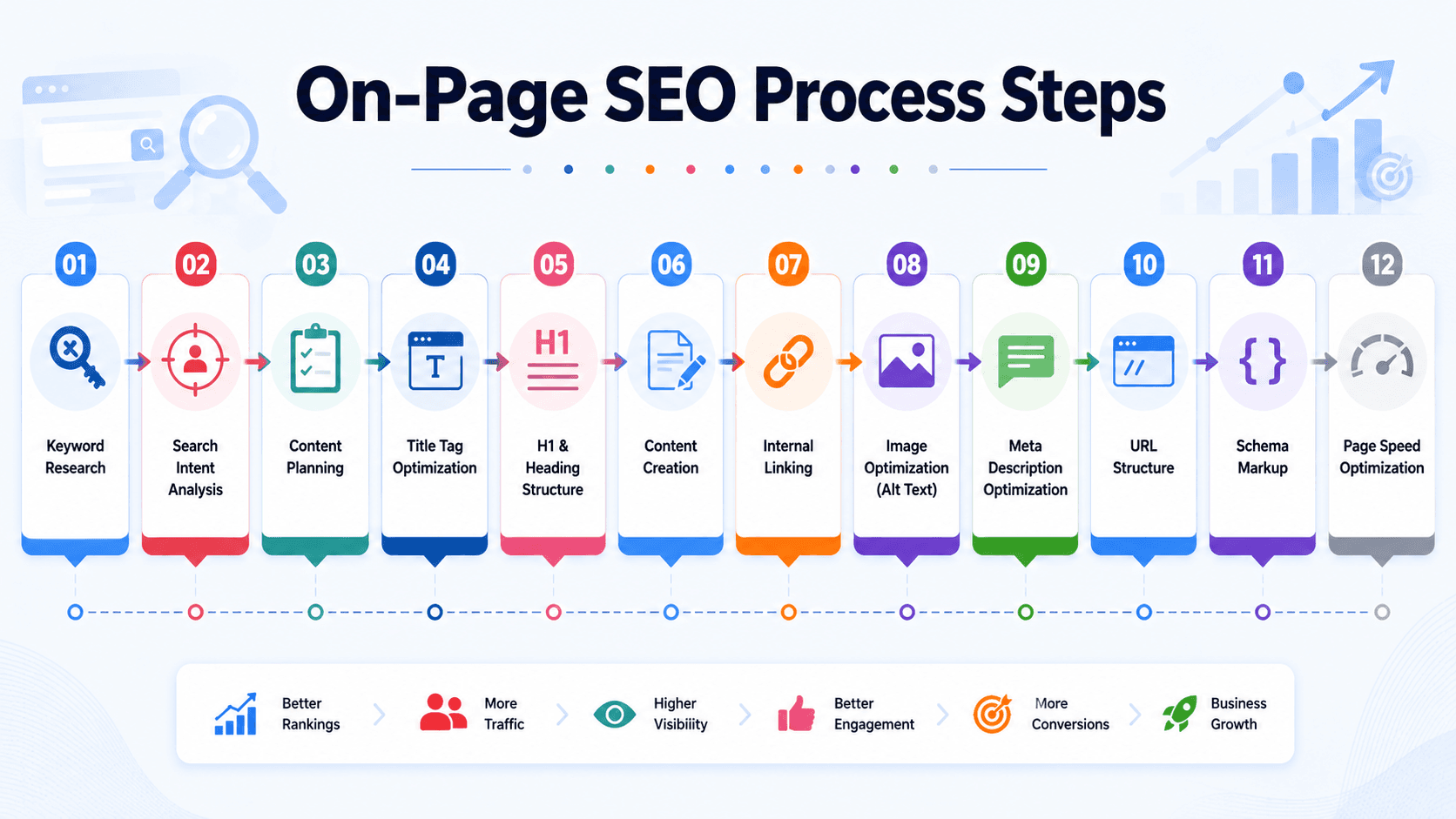
Knowing the elements is one thing — sequencing them into a repeatable process is another. Here's the order that tends to work best in practice:
Start with keyword research. Map out the terms that match both your business goals and your audience's actual search behavior.
Build the content around user intent. Address the question behind the search, not just the keyword itself, and weave the target term in naturally.
Write the title tag and meta description. Make them compelling enough to earn the click, not just technically correct.
Clean up the URL. Keep it short, lowercase, and descriptive.
Structure with proper headings. One H1, followed by a logical sequence of H2s and H3s that mirror how a reader would skim the page.
Optimize every image. Descriptive alt text, sensible file names, and compressed file sizes.
Add internal links. Point to related, relevant pages using anchor text that describes the destination.
Check mobile responsiveness. Google indexes mobile-first, so a page that breaks on a phone screen is already at a disadvantage.
Improve page speed. Compress assets, minify CSS/JS, and lean on a CDN where it makes sense.
Add schema markup. Structured data won't guarantee a rich result, but it gives search engines the clearest possible read on your content.
Why Does Heading Structure Matter So Much for On-Page SEO?
Headings aren't just a formatting choice — they're one of the clearest structural signals you can hand to a search engine. A single H1 establishes what the page is fundamentally about, and a clean H2/H3 hierarchy beneath it breaks that topic into digestible sections.
There's a practical reason this matters beyond rankings, too: most visitors don't read a page top to bottom on their first visit — they scan it. A logical heading structure lets someone skim straight to the section that answers their specific question, which keeps them on the page longer and reduces the chance they'll bounce back to the search results. Google has stated plainly that heading tags help its systems understand the structure of a page, which is a fairly direct admission that this isn't just a cosmetic detail.
This matters for AI-driven search too, not just traditional rankings. Well-structured, semantically clear content is exactly what generative engines pull from when assembling AI Overviews or chatbot answers, and content depth and readability now matter more to AI citation than traditional metrics like backlinks or raw traffic (Growth Memo, via Position Digital).
Takeaway: a page that's easy for a crawler to outline is usually a page that's easy for a human to skim — the two goals rarely conflict.
Why Do Title Tags and Meta Descriptions Deserve Extra Attention?
Your title tag is frequently the very first thing a potential visitor reads about your page, and it has an outsized effect on whether they click at all. Google's own guidance is direct on this point: write descriptive, concise titles, avoid vague text like "Home," and don't stuff the same keyword into the tag multiple times, since that reads as spammy to both users and search engines (Google Search Central).
It's also worth knowing that Google doesn't always display the exact title you wrote. If your title is missing descriptive text, outdated relative to the page's actual content, or padded with repeated boilerplate across many pages on your site, Google may generate its own version of the title link instead, pulled from your H1, anchor text, or other on-page signals. The practical fix is the same either way: write a title that's accurate, specific to that page, and free of repetition, and Google has far less reason to override it.
Meta descriptions work differently — they're not a direct ranking factor, but they function as your ad copy inside the search results, and a well-written one can meaningfully change your click-through rate even at the same ranking position. A meta description that simply restates the title in different words wastes the opportunity; the better approach is to use it to add context the title couldn't fit, and to close with a reason to click.
How Does On-Page SEO Affect Page Speed and User Experience?
Search engines have made it clear that user experience is part of how pages get evaluated, and page speed sits near the top of that list. Slow-loading pages frustrate visitors before they ever reach your content, and that frustration shows up as higher bounce rates — a signal that tends to drag rankings down over time.
The fix is usually mechanical rather than mysterious: compress and properly size images, minify CSS and JavaScript, lean on browser caching, and use a content delivery network if your audience is geographically spread out. None of these are exotic tactics — they're maintenance that pays for itself.
What Role Does Internal Linking Play in On-Page SEO?
Internal links do two jobs at once: they help visitors discover related content, and they help search engines understand how pages on your site relate to each other. A page that receives links from several other relevant pages on your domain typically carries more authority in a crawler's eyes than an orphaned page with no internal links pointing to it at all.
The detail that's easy to overlook is anchor text. Generic phrasing like "click here" wastes the opportunity — descriptive anchor text (e.g., linking the phrase "technical SEO checklist" rather than "this page") gives both users and search engines useful context about what's on the other end of that link. Internal links also distribute what's often called "link equity" across a site — pages that earn external backlinks can pass some of that authority on to related internal pages through a well-planned linking structure, which is one reason a thoughtful site architecture pays off long after the initial content is published.
If you're auditing your own site's internal linking, our technical SEO services page walks through how that audit typically works, and it's often the fastest on-page fix to implement since it usually doesn't require touching existing content at all — just adding a handful of well-placed links between pages that are already live.
How Long Does It Take to See Results From On-Page SEO?
This is the question almost everyone asks, and the honest answer is: it depends on competition and execution quality, but most sites see measurable movement within a few weeks to a few months rather than overnight. On-page fixes tend to compound — a cleaned-up title tag might lift click-through rate within days, while deeper content and structural improvements often take longer to fully reflect in rankings as search engines re-crawl and re-evaluate the page.
Patience matters here, but so does not waiting indefinitely without checking your work — regular monitoring through analytics is what separates "we did SEO once" from an actual ongoing strategy.
Frequently Asked Questions
What is on-page SEO?
A: On-page SEO is the practice of optimizing individual elements on your own website — content, title tags, headings, URLs, images, and internal links — to improve how search engines understand and rank that page.
Why is on-page SEO important?
A: It directly affects how search engines interpret your content's relevance, and it shapes the user experience that keeps visitors engaged rather than bouncing back to the results page.
How is on-page SEO different from off-page SEO?
A: On-page SEO covers everything you control directly on your own site — content, structure, and metadata. Off-page SEO covers external signals like backlinks and brand mentions from other websites.
How long does on-page SEO take to show results?
A: Most sites start seeing measurable changes within a few weeks to a few months, though the exact timeline depends on competition, current site health, and how thoroughly the optimizations are implemented.
What are common on-page SEO mistakes to avoid?
A: Keyword stuffing, ignoring mobile responsiveness, skipping meta tags entirely, and publishing thin content that doesn't genuinely answer the searcher's question are among the most frequent and costly mistakes.
Does on-page SEO still matter with AI Overviews and AI search on the rise?
A: Yes — if anything, it matters more. The vast majority of pages cited in Google's AI Overviews also rank in the traditional top 10 organic results, meaning solid on-page fundamentals remain the clearest path to visibility in AI-driven search too (Vefogix).
Conclusion: Is On-Page SEO Worth the Investment?
On-page SEO isn't a one-time checklist — it's an ongoing discipline that touches nearly every part of how your website performs in search. From keyword research and content quality to heading structure, page speed, and internal linking, each element reinforces the others, and skipping any one of them tends to cap how well the rest can perform.
The data makes the case clearly: top-ranking pages capture a disproportionate share of clicks, and the sites that consistently invest in on-page fundamentals are the ones that keep showing up — in traditional results and increasingly in AI-generated answers too. If your site's on-page SEO hasn't been audited recently, that's usually the fastest place to find quick wins.
Get Your Free SEO Audit | Explore Our SEO Services
attributed to "Growth Memo" as aggregated by Position Digital — also a secondary source. The "76.1% of AI Overview URLs also rank top 10" stat is attributed to Vefogix, citing unspecified underlying research — recommend independent verification of this one specifically, as the original primary source wasn't identified.
Category flag: "SEO" was used per the available category list — this fits cleanly and needs no client confirmation, unlike AI/general-tech topics which would need the "Development" fallback noted in the brief.
Internal links used: Two distinct internal links placed naturally in the body — /services/link-building (in the opening section) and /services/technical-seo (in the internal linking section) — plus /services/seo and /contact in the two CTA buttons. Please confirm these are the correct live URLs, as they were inferred from naming convention rather than verified directly against the live site.
Schema reminder: Please add FAQPage schema (JSON-LD) for the FAQ section before publishing, per standard practice.
Word count, keyword count, and structural checks below were verified programmatically — see chat reply for the breakdown.